Friday, 12 April 2013

Productivity: Two command-prompt time savers

Recently while watching pluralsight.com videos I noticed that the authors use a console window which allowed them to select and copy text using mouse. And they also had auto-completion for files/directories. As a developer, we work a lot with console applications now and then and having these two features should be a huge time saver.

1> Text selection, copy and paste

Normally we have to click Edit –> Mark –>  Select text –> Press Enter, but there is a quicker way!

- Right-click the title bar and click Properties.

image

image


- In the Options tab, look for “Quick Edit Mode” and enable it.

image


With this setting, we can use left-button mouse to select text and then right-button click or ENTER to copy it. And to paste something, we can click right-button.

image


2> Auto-completion for files/directories:

For the auto-completion we need to modify the registry. The steps are:
- Open regedit.exe
- Look for HKEY_CURRENT_USER\Software\Microsoft\Command Processor
- Change the value of CompletionChar to 9.

image


On my computer this was already set to 9, it could be different on yours. Using screen shot I cannot show you how it works, but start by pressing [TAB] on console and it will iterate the directories/files one by one. And when you type in ‘CD D:\[TAB]’ then it would again do the same thing for D:\ drive.

You can also type in a letter, say ‘w’, and then press [TAB] – it will one by one go through all the items in the folder which start with ‘w’.

Hope knowing this saves a few minutes of your life.

Tuesday, 9 April 2013

C#: object, var and dynamic

One of the interesting concept introduced in C# 4 was the “dynamic” keyword. Let’s see how it is different from the “var” or our old friend “object”.

1. System.Object has been with us since the birth of .NET framework. It is the base class of almost everything. It means we can write:

1:      object ostring = "Hello";
2:      object oint = 555;
3:      oint = "Hello int"; //point to a string
4:      ostring = -100;//point to an int

Usage: It is used when the type could be anything. For example a method using object parameter to accept any type and then casting it to appropriate type or use reflection to call operations; or a collection which can hold any type. However with the advent of generics ‘object’ is used less often when creating collections. The primary goal of object class is to be a base class and offer low-level services, which include methods which are common to almost every type in .NET framework or created by users. Methods like ToString(), Equals(), GetHashCode(), MemberwiseClone() are provided in the object class which can be reused or overridden (except Finalize of course which can’t be overridden).

2. “var” was introduced in C# 3.0 mainly to support anonymous types created using LINQ.

Taking this LINQ query:

1:  var courses = from course in Courses
2:                where course.Category.Contains("C#")
3:                select new {course.Title, course.Description, course.VideoLength};

The query will return a collection of type IEnumerable. What do you think will be the type of the items in the IEnumerable returned?

If we run this line:


courses.First().GetType().ToString();
//above line returns: <>f__AnonymousType0`3[System.String,System.String,System.String]

we get a type name which is generated dynamically!

But we may ask why not just use ‘object’ type to write it this way:

1:  IEnumerable<object> courses = from course in Courses
2:                where course.Category.Contains("C#")
3:                select new {course.Title, course.Description, course.VideoLength};
4:   
5:  foreach (var course in courses)
6:  {
7:      course.Dump();
8:  }

Yes it compiles without error but you will face a problem when you iterate the collection’s items. Let me attach a screen shot to show what I mean:

image

Since we specified <object> in the IEnumerable we get types as objects. But if we use var – it would implicitly create a new type and expose its properties to you. Again a screen shot with ‘var’

image

That’s the power of anonymous types, you don’t need to declare a new class with the three properties which you want from the collection. Let the compiler do everything for you!

Usage: ‘var’ cannot be used if they are not initialized and they cannot be used in method parameters.

   1:  void Main()
   2:  {
   3:      var i; //Error: Implictly-typed local variables must be initialized
   4:  }
   5:   
   6:  void Test(var i) //Error: The contextual keyword 'var' may only appear within a local variable declaration
   7:  {
   8:      
   9:  }

Also once the var is declared with a specific type it cannot be assigned a value which is not compatible. For e.g.

1:      var i = 123;
2:      i = false; //Error: Cannot implictly convert type'bool' to 'int'

3. “dynamic”: Dynamic was introduced in C# 4.0. It is very different from ‘var’ which is evaluated at compile time, where the dynamic variable is determined at run-time. Based on the value assigned to the dynamic variable the appropriate type is determined at run time (also known as late-binding).

1:      dynamic d = "Hello";
2:      string type = d.GetType().ToString(); //System.String
3:   
4:      d = false;
5:      type = d.GetType().ToString(); //System.Boolean

The above code compiles successfully. In fact even this will compile:

1:      dynamic dmic = 555;
2:      dmic.DoSomethingOnThisNumber();

But of course at run time it will identify it as System.Int and give error: “RuntimeBinderException: 'int' does not contain a definition for 'DoSomethingOnThisNumber'”Dynamic can also be used in un-initialized fields and method parameters. So both of uses below are legal:

1:  void Main()
2:  {
3:      dynamic i; //No Error
4:  }
5:   
6:  void Test(dynamic i) //No Error
7:  {
8:      
9:  }

Wednesday, 13 March 2013

WCF: Duplex Contracts

WCF supports three types of message exchange patterns:

1. Request-Reply
This is the default mode. A point to note is that even if the return type of a service operation is “void” a response would still be sent back to the client.

2. One-way
In one-way operations, the service after queuing up the call doesn’t send anything back to the client. Few details:
- we need to apply “IsOneWay=true” on the operation we want to behave like a one-way
- method type return must be void
- for any exceptions in the service operation, client doesn’t receive any feedback (faults are not returned back).
- the client after making the call returns back immediately to continue execution even if the service operation is still in progress.

3. Duplex
Duplex allows two-way communication. The client makes a call to the service, and then later the service can make a separate call to the client (this call is different from the reply sent back to client for the first call). The call the service makes to the client has its own request-response flow. In Duplex communication, we need to have two contracts, one implemented by the service (incoming contract) and one by the client (callback contract).

Classic examples of duplex communication are chat applications, stock quote or game score notifications. Let’s try a stock quotes notification service.

Not all channels support duplex communication. The supported ones are: NetTcpBinding, NetNamedPipeBinding. and on HTTP we need to use the special wsDualHttpBinding (the standard http bindings - basicHttpBinding and wsHttpBinding are not bi-directional)

Demo - Stock Quote Service Application: Assume we are a service provider of stock quotes. We want to expose a service which would allow clients first to register with a stock symbol to receive stock quotes, and as long as client doesn’t disconnect or explicitly unregisters we will keep sending back messages with stock quotes.

Contracts:

We need two contracts in duplex:
- IRequestStockQuotes: incoming contract implemented at the service end
- IQuoteNotification: callback contract implemented by the client

namespace StockQuotes.Common
{
[ServiceContract(CallbackContract=typeof(IQuoteNotification))]
public interface IRequestStockQuotes
{
[OperationContract]
void RequestNotifications(string symbol);
}

[ServiceContract]
public interface IQuoteNotification
{
[OperationContract]
void SendQuote(StockQuote quote);
}
}

Service :

[ServiceBehavior(ConcurrencyMode = ConcurrencyMode.Multiple)]
public class StockService : IRequestStockQuotes
{
public void RequestNotifications(string symbol)
{
Console.WriteLine("Got request for symbol:" + symbol);
IQuoteNotification client = OperationContext.Current.GetCallbackChannel<IQuoteNotification>();
StockQuote quote = QuoteEngine.GetQuote(symbol); //from a real-time quote server
client.SendQuote(quote);
}
}

The concurrency mode of the service needs to be ConcurrencyMode.Multiple or Reentrant, the default mode ConcurrencyMode.Single would create a deadlock situation. An alternative could be mark the callback operations “One-Way”.. In the service method we fetch the client callback from the OperationContext.Current.GetCallbackChannel<T> and call the method “SendQuote” to call the client.

Service Host:

ServiceHost host = null;
try
{
host = new ServiceHost(typeof(StockQuotesService.StockService));
host.Open();
foreach (ServiceEndpoint ep in host.Description.Endpoints)
{
Console.WriteLine(ep.Address.Uri.ToString());
}
Console.WriteLine("Stock service now running. \n<ENTER> to close.");
Console.ReadLine();
host.Close();
}
catch (CommunicationException)
{
if (host != null)
{
host.Abort();
}
}
catch (TimeoutException)
{
if (host != null)
{
host.Abort();
}
}
catch (Exception)
{
if (host != null)
{
host.Abort();
}
}

Client:

First we implement the callback contract -

namespace Client
{
public class QuoteNotification : IRequestStockQuotesCallback
{
public void SendQuote(StockQuote quote)
{
Console.WriteLine("Received quote (callback) from service: Symbol {0}, Quote {1}", quote.Symbol, quote.Quote);
}
}
}

An important point to note here is that , I used ‘Add Service Reference’ from Visual Studio and that’s why the name of callback contract was changed from IQuoteNotification to IRequestStockQuotesCallback. I think this was done by the code-generation utility to match the service interface name “IRequestStockQuotes”.

The calls:

static void Main(string[] args)
{
InstanceContext ctx = new InstanceContext(new QuoteNotification());
RequestStockQuotesClient client = null;

try
{
client = new RequestStockQuotesClient(ctx);
client.Open();
Console.WriteLine("ENTER to call service:");
Console.ReadLine();
client.RequestNotifications("MSFT");
client.RequestNotifications("INTL");
client.RequestNotifications("RIM");
client.RequestNotifications("NSDQ");
client.RequestNotifications("A");
Console.ReadLine();
client.Close();
}
catch (CommunicationException)
{
if (client != null)
{
client.Abort();
}
}
catch (TimeoutException)
{
if (client != null)
{
client.Abort();
}
}
catch (Exception)
{
if (client != null)
{
client.Abort();
}
}
}

Output:

Service console:


image
Client console:

image 
Further improvements:

What we did was our first implementation, there is a scope of improvement here. Right now the client calls the “RequestNotifications” service method and immediately the service sends back the quote. To get the next quote the client will again have to call the service, which is not a good implementation. Ideally the client should register to receive the quote stream and then whenever service gets a new quote it should send it to the client. This would create the live-streaming environment. We will try to accomplish that in next post.

Saturday, 9 March 2013

Introducing OData

Last weekend I introduced myself to OData. Here are the findings :-)

Contents:

1. Scenarios
2. Approaches
3. OData
4. Using LINQPad to access NetFlix
5. Examples from the Real World (ecosystem)
6. Resources
7. Developing OData Services(WCF Data Service, ASP.NET Web API)
8. Accessing OData Services (.NET client, jQuery)
9. Limitations
10. And GData?

First let’s start with the scenarios or the domain where OData can be relevant.

Scenarios:

- Let’s say you are a company which runs buses. You are looking for ways to share the information about buses such as arrival time, frequency, operating hours, capacity, service closures etc. You want other web sites and smart phone applications to be able to access this data. How would you do it?
- Say you are working for an online video streaming company like NetFlix and you want to expose your data about movie titles, availability, reviews etc. You want to share this information over the web so that e-commerce web sites like Amazon can create a catalog of your products or you are writing a Windows 8 app to display data from NetFlix.
- Say you are manager of a government department and you have a legal requirement to expose the data about projects such as date of completion, cost, overruns, tenders etc. on a web site and also in a format which can be easily accessed by other govt. applications

Now for all these scenarios we could have created a web site and displayed data on it, thereby creating a data island. But how can we make the data “reusable”, so that other applications (web /mobile) could consume it?

Also, a common requirement among the use cases above is that they return a list of entries or items. It is not about a request-response where you build a request package with some parameters and the service sends back the response after doing some calculation. This is more about - I want to expose data on my company’s URL say www.example.com/movies to share all the movie titles or www.busservice.com/buses to expose information about all the buses I have and step deeper www.nybusservice.com/buses(11)/frequency to get the frequency of bus with ID of “11”.

Approaches:

1) SOAP: We could create a WCF service (which uses SOAP format), host it in IIS so that it could become part of the organization’s web infrastructure. Now SOAP enables us to use WS-* protocols, metadata (WSDL); we can define operations like GetMoviesTitles, GetMovieReviews and also give us security, transactions, reliability, interoperability over HTTP. It supports request-response pattern over HTTP Post. But that is a lot of stuff made available to us, which may not be useful to use in certain scenarios.

2) POX (Plain Old XML): We could expose a ASP.NET URL and return XML data (could be done by writing our own http handler). The problem here is the data structure. The clients will have to ‘know’ the schema before hand to access the data and also we need to write extra stuff to enable CRUD operations. The advantage here is we avoid all the SOAP overhead.

3) REST: REST is an architectural style using the concept of ‘resources’ and how we can identify them with a URI, along with a fixed verbs for actions – GET, POST, PUT and DELETE for the CRUD operations on those resources. By using these HTTP verbs, it is easy for consumers to realize what actions need to be performed for interacting with the data.

In the scenarios above, let’s add one more - assume you run a blogging engine like Blogger, WordPress etc. The posts that your users write on your blogging engine needs to be exposed in a way so that blog readers (like Google Reader) could read the posts. You could again send back XML containing a list of all the posts in your own XML format. But then what would happen if every blog engine out there created its own format. Of course as we know this problem has been solved – all the blog engines use a standard format called Atom or RSS. This makes it easier for feed readers to just point to a URL and get all the posts and because they know it’s in Atom format it makes it quite easy for them. The Atom format is only for getting resources, and AtomPub (used by OData) is for editing web resources.

If we come to think of it, wouldn’t it better if we could return an Atom/RSS feed from our services? The atom/rss feed XML is understood by modern day browsers so anyone with a browser could go to the URL and get the data. This is in fact possible today with WCF. We could create RESTful services and reply back syndication feeds in RSS or ATOM format, sending back a list of your business objects.

But there is still a need of some more functionality to make it useful. Functionality like metadata, paging and filtering the feeds, for this we use OData. So we can say “OData is exposing your business objects (as a list/collection) over HTTP URL in a RESTful manner, by returning data in XML-AtomPub format along with providing facilities like metadata, filtering and paging.”

OData:

The “O” in OData stands for “Open”, the full name is “Open Data Protocol”. It is REST based, using HTTP + AtomPub + JSON.

The definition from OData.org:
"The Open Data Protocol (OData) is a Web protocol for querying and updating data that provides a way to unlock your data and free it from silos that exist in applications today. OData does this by applying and building upon Web technologies such as HTTP, Atom Publishing Protocol (AtomPub) and JSON to provide access to information from a variety of applications, services, and stores."

Let’s explore the NetFlix OData a little. If we browse to the URL http://odata.netflix.com/v2/Catalog/, this is what we get:

image

Under the <service> we have various collections: Genres, Titles, TitleAwards so on. If want to get all the titles we browse to: http://odata.netflix.com/v2/Catalog/Titles, and we get

image


We can see here it starts with the tag <feed> and there is an <entry> tag for every Title returned by the NetFlix service. In the <entry> you will find an “id” which will point to the URL we can use to get details about that particular Title.

image 
If we go to URL http://odata.netflix.com/v2/Catalog/Titles('13aly') we get:
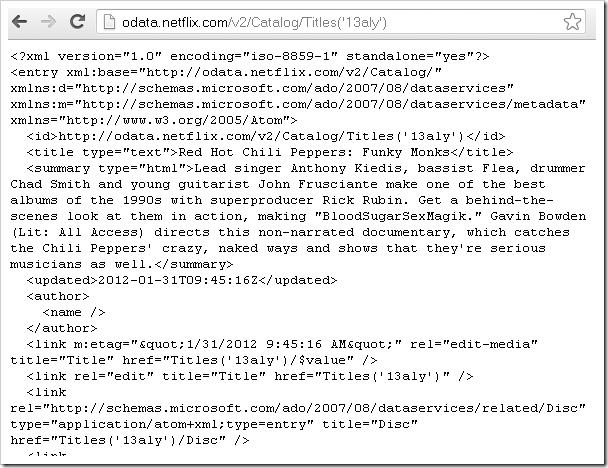
image

Using LINQPad to access OData services:

In the previous section we saw how we can see the OData in browser, now we will see how we can use LINQPad to access it.

I am using LINQPad 4, but the steps should be same for other versions. The first step is to ‘Add connection’ in LINQPad, for this you can click the ‘Add Connection’ link given in the left pane.

image 
Upon clicking we get this dialog:

image 
Select “WCF Data Services 5.1..” and click Next and enter the URI.

image 
After clicking OK, you should get the NetFlix in the connection list along with various collections it exposes.

image 
We can now query the data with LINQ queries. 

> Get 10 genres:
Genres.Take(10)

image 
> Get the movies released this year: 

image 
Examples (Live):

- http://pluralsight.com/odata/ (PluralSight is my favorite web site, here it gives data about courses, authors, modules etc.)
- http://data.stackexchange.com/stackoverflow/atom (the stackoverflow web site gives a good amount of data for questions, answers, comments etc.)
- http://odata.netflix.com/v2/Catalog/
- and more here: http://www.odata.org/ecosystem. This link gives the list of many companies which are offering OData as of today.

Resources:

- OData.org: Introduction
- MSDN: WCF Data Services
- MSDN: Open Data Protocol by Example
- OData with Scott Hanselman
- MSDN: Getting Started With OData Part 1: Building an OData Service
- MSDN: Getting Started With OData Part 2: Building an OData Services from Any Data Source
- OData: There’s is a feed for that

(The rest of sections will be coming in the next blog post)

Wednesday, 6 March 2013

SQL Server 2012: IIF

SQL Server 2012 introduces the “IIF” function, it’s a shorthand for the CASE expression. I am sure C# developers would love it!

An example: here we are fetching the columns in the table (HumanResources.Employee) using sys.columns and sys.types

> Using CASE

USE
AdventureWorks2012
GO

SELECT      col.[Name], 
CASE col.[is_nullable] WHEN 1 THEN 'Yes' ELSE 'No' END AS [IsNullable],
CASE col.[is_identity] WHEN 1 THEN 'Yes' ELSE 'No' END AS [IsIdentity],
types.[name] as [DataType],
col.[max_length] AS [MaxLength]
FROM sys.columns col
INNER JOIN sys.types types ON
col.[user_type_id] = types.[user_type_id]
WHERE col.[object_id] = object_id('HumanResources.Employee')
ORDER BY col.[NAME]
GO

> Using IIF
SELECT col.[Name], 
IIF(col.[is_nullable] = 1, 'Yes', 'No') AS [IsNullable],
IIF(col.[is_identity] = 1, 'Yes', 'No') AS [IsIdentity]
,
types.[name] as [DataType],
col.[max_length] AS [MaxLength]
FROM sys.columns col
INNER JOIN sys.types types ON
col.[user_type_id] = types.[user_type_id]
WHERE col.[object_id] = object_id('HumanResources.Employee')
ORDER BY col.[NAME]
GO

> Output of the two queries

image

Wednesday, 30 January 2013

WPF / MVVM Resource Collection

Open Source Applications Using WPF:

- Kaxaml (http://kaxaml.codeplex.com/)
- FamilyShow (http://familyshow.codeplex.com/)
- BabySmash (http://babysmash.codeplex.com/)
- Microsoft Ribbon for WPF October 2010 (http://www.microsoft.com/en-us/download/details.aspx?id=11877)
- Crack.NET (http://cracknetproject.codeplex.com/)
- Prism (http://compositewpf.codeplex.com/)
- Snoop (http://snoopwpf.codeplex.com/)
- BBQShack (http://karlshifflett.wordpress.com/2010/02/07/bbq-shack-ocean-v2-for-visual-studio-2008/)
- Tasks.Show (http://windowsteamblog.com/windows/b/developers/archive/2011/02/24/tasks-show-a-windows-7-developers-resource.aspx)

Links:


1> WPF Apps With The Model-View-ViewModel Design Pattern – Josh Smith
http://msdn.microsoft.com/en-us/magazine/dd419663.aspx
Code at: http://archive.msdn.microsoft.com/mag200902MVVM

2> In the box with VS 2010
http://visualstudiogallery.msdn.microsoft.com/3ab5f02f-0c54-453c-b437-8e8d57eb9942/

3> Exploring a Model-View-ViewModel Application; WPF Password Manager, Cipher Text
- By Karl Shifflett
http://www.codeproject.com/Articles/32101/Exploring-a-Model-View-ViewModel-Application-WPF-P

4> WPF Business Application Series Part 1 of n - Application Structure, Skinning, and Custom ToolBar Button Control
http://www.codeproject.com/Articles/23524/WPF-Business-Application-Series-Part-1-of-n-Applic

5> Localizing a WPF application
http://www.codeproject.com/Articles/31837/Creating-an-Internationalized-Wizard-in-WPF

6> Task Library
http://www.codeproject.com/Articles/152765/Task-Parallel-Library-1-of-n

7> WPF - Beginner's guide
http://www.codeproject.com/Articles/22980/WPF-A-Beginner-s-Guide-Part-1-of-n

8> Threading with WPF
http://www.codeproject.com/Articles/49659/WPF-A-Most-Useful-Threading-Component

9> Essential Facebook Programming: Building a Windows Client in WPF (MSDN Jan 2013)
http://msdn.microsoft.com/en-us/magazine/jj883950.aspx

Videos:

- Jason Dolinger’s video on MVVM:
  http://blog.lab49.com/archives/2650
  http://www.lab49.com/wp-content/uploads/2011/12/Jason_Dolinger_MVVM.wmv

- The Full-Stack
  http://channel9.msdn.com/Series/The-Full-Stack/The-Full-Stack-Part-14-Taking-a-look-at-MVVM-with-John-Papa
  http://channel9.msdn.com/Series/The-Full-Stack/The-Full-Stack-Part-15-Starting-a-Pomodoro-application-with-MVVM
  http://channel9.msdn.com/Series/The-Full-Stack/The-Full-Stack-Part-16-More-MVVM-Fun-With-Some-More-Complex-Binding-Scenarios

Tuesday, 15 January 2013

PowerShell: Files and Directories

Many times we feel the need to get the list of files in a directory with all the file details. A picture (screenshot) is worth a thousand words (pixels) but at times it is not the best thing.

(1) Get the file list

Command: cd “C:\Program Files\Adobe\Reader 10.0\Reader”
Command: DIR

image 
This will give us the list, nothing unusual.

(2) Send the list to a text file

Command: DIR > C:\FileList.txt

The file “FileList.txt” will contain the same text that was shown on console

(3) Get only the files or only directory list

The list contains both the directories and files, how do we get only the files? (we can’t do this in a explorer)

Command: PS C:\Program Files\Adobe\Reader 10.0\Reader> dir | where{$_.Attributes -ne "Directory"}

image 
The output of DIR is sent to where{}, the “$_” is the current item, Attributes is a property, “-ne” means “not equal to”. Each item in the output of DIR is checked for having the “Directory” attribute. Fantastic!

To get only the directories – we change “-ne” to ‘-eq”
Command: PS C:\Program Files\Adobe\Reader 10.0\Reader> dir | where{$_.Attributes -eq "Directory"}

(4) Sort by size

So now we have “file only” list, let’s sort by size. This would be useful in next step.
Command: PS C:\Program Files\Adobe\Reader 10.0\Reader> dir | where {$_.Attributes -ne "Directory"} | sort-object Length

”Length” is a column in the output, which is also a property in each item.

 image

(5) Get only top 5

Command: PS C:\Program Files\Adobe\Reader 10.0\Reader> dir | where {$_.Attributes -ne "Directory"} | sort-object Length | select-object -first 5

(6) Get only the name of file

There is an extra Mode column in the output, let’s get only the Name and Length.

Command: PS C:\Program Files\Adobe\Reader 10.0\Reader> dir | where {$_.Attributes -ne "Directory"} | sort-object Length | select-object -first 10 | select-Object Name, Length

image 

(7) Save the list as .CSV file

It would be interesting to store the output as CSV file to open it in Excel.

Command: PS C:\Program Files\Adobe\Reader 10.0\Reader> dir | where {$_.Attributes -ne "Directory"} | sort-object Length | select-object -first 10 | select-Object Name, Length | Export-csv c:\filelist.csv

Monday, 14 January 2013

Windows PowerShell - Get new GUID

Recently I took a brief tour of PowerShell, it’s the Microsoft’s task automation framework. It would suit you more if you consider your keyboard as your friend :). At the moment, I do not know whether I think it is useful or not. I think the more I get to know the various commands, the more I will use and appreciate it.

I am writing this post, so that I can record the PowerShell commands that I begin to use. Here’s is the first one:

Get a new GUID: Currently I use Visual Studio 2005 to get a new GUID value. Now opening up VS just to do that is really an overkill.
In PowerShell we can get it by:

image
[guid] is a type adapter (you can say alias) to the full class name – System.Guid. NewGuid() is a static method on that class.

If we don’t remember the adapter but if we do know the full class name, we can use –> $guid = [System.Guid]::NewGuid()

Wednesday, 5 December 2012

Uninstall problems – solved by Microsoft Fixit

Many times, I think very frequently, we face problem with uninstalling a software. This happens on our development machine where we many times install/uninstall software, sometimes clearing the local MSI cache, uninstalling patches and of course registry corruption – all making it a nightmare when we simply want to uninstall by going to Control Panel – Add/Remove Programs.

Network resource dialog

Now here is one thing that can help:

Microsoft Fix It:
http://support.microsoft.com/mats/Program_Install_and_Uninstall

Also a link from Apple:
http://support.apple.com/kb/TS3704

Recently we had an issue with uninstalling a software which was looking for MSI file and telling “The feature you are trying to install is on a network resource that is unavailable”. We ran this tool and it fixed the registry. The software causing the problem is no longer listed in the “Installed Programs” list in Add/Remove Programs.

Screenshots from the tool:

image 
Edit: Clicking ‘Accept’ in the screenshot above actually downloads the tool and at times there is difficulty in connecting – could be because of proxy issues or Microsoft server was down perhaps.

Wednesday, 14 November 2012

Blog Statistics

Howdoicode.net crosses 5,000 page views. Very happy and thank you making those visits! :-)

 image

Microsoft’s patent application for cloud compilation

This is a link which will take you to the patent application from Microsoft for its new compilation in the cloud service for Windows Phone 8 apps.

http://www.freepatentsonline.com/20110258616.pdf

It’s for the first time that I am reading a patent application. I never knew the technical details given were so exhaustive and in-depth. In fact it could be turned into a book.

More details:
http://www.zdnet.com/microsoft-details-its-strategy-for-compiling-windows-phone-apps-in-the-cloud-7000007185/
http://channel9.msdn.com/Events/Build/2012/3-005

Shorts - week 3, 2022

Post with links to what I am reading: 1. A very good post on different aspects of system architecture: https://lethain.com/introduction-to-a...